

Yesterday I watched Claude pull thirty invoices into a spreadsheet, compare a web page in two browsers, and read a stranger’s install script and refuse to run it. It did all of that on a computer of its own.
That computer is called metacomputer, and today I’m releasing it as open source. It’s a separate computer that runs inside your Mac, a virtual machine. Claude Code uses it the way you would. It opens apps, clicks, types and checks its own work.
If you have Claude Code on a Mac with Apple silicon, you can have one running in about five minutes. Paste this into Terminal:
curl -fsSL https://raw.githubusercontent.com/metavert-io/metacomputer/main/get.sh | bashIt installs metacomputer as a Claude Code plugin, builds the computer and checks that everything works. There’s no VM for you to set up. You need macOS 14 or later and about 15 GB free. Then start a new Claude Code session and ask:
“Get yourself a virtual computer and tell me what’s on its screen.”
“Make a LibreOffice Calc spreadsheet of the planets’ diameters, add a column chart, and save it as planets.xlsx.”
“Someone sent me this link. What does it do, and is it safe to open?”
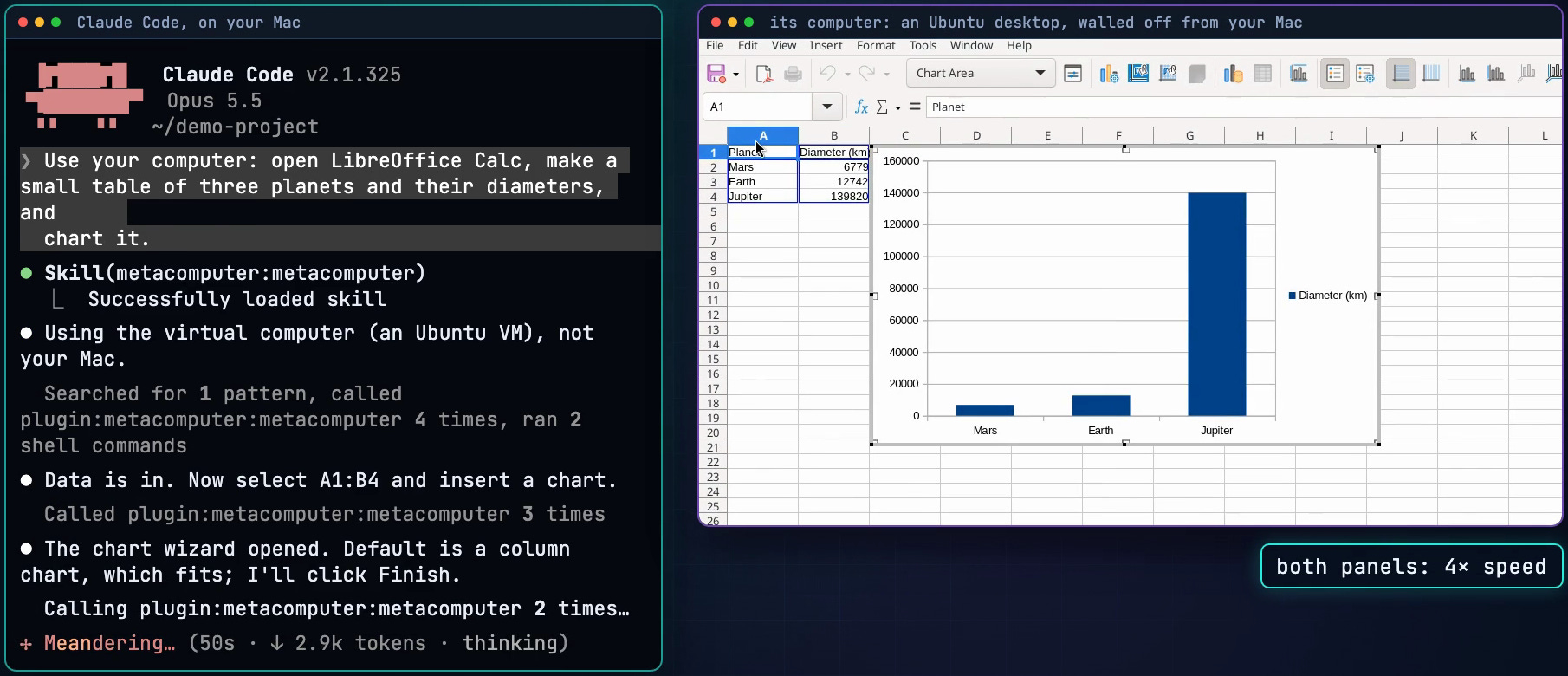
None of the pieces are new
Computer automation isn’t new. AIs that control a screen aren’t new either. What’s new is the package: a computer you can actually use, with the protections you’d normally only find on a cloud computing platform.
When an engineering team runs software in the cloud, it gets a toolkit. metacomputer brings that toolkit to one Mac, for one user. The user happens to be an AI.
An isolated machine with network rules. It reaches the public internet and nothing else: not your Mac, your home network or your private Tailscale network.
A secrets manager with approvals. Passwords and API keys stay on your Mac, and each use can wait for your Touch ID.
Storage that sticks. Disks that survive a reset, Mac folders (read-only unless you say otherwise) and folders kept in step with S3.
Snapshots and reset. Save the computer, go back to a save, or return to a clean desktop with one command.
An audit trail. An optional signed log of every action, and events sent to Slack, your phone, a SIEM or OpenTelemetry.
Several computers side by side. New in v0.3.1:
metacomputer vm create.
There’s no account to create and no subscription. It’s MIT licensed.
Earlier this year I wrote that software’s creator era has arrived: tools built for engineers get packaged for everyone else. This is that step for cloud infrastructure, built from open parts, mostly Cua’s open-source stack. I’ve long argued that composability is the most powerful creative force in the universe. metacomputer is a small example.
What it can do
Firefox, Chrome and LibreOffice come installed, and any Ubuntu app is one setting away. Claude reads each app’s structure the way a screen reader does, instead of guessing from pixels, and checks the result of every step. A few things you can hand it:
Turn a folder of PDF invoices into a spreadsheet with totals and a chart.
Test your web app in Firefox and Chrome, at phone and desktop widths, and record it.
Open a suspicious link in a throwaway browser and report where it really goes, without clicking anything on the page.
Sign in to a site with your saved password and 2FA code, without ever seeing them.
Run a second Claude Code inside the computer for risky work, like a repository from a stranger, then reset.
Make a small game, with the art drawn in Inkscape and the sound edited in Audacity.
In 2023 I wrote that we were entering the direct-from-imagination era. An agent that can use real software, the way we do, gets us closer.
Credentials the AI never holds. Sooner or later an agent needs to sign in. The vault on your Mac types the password or 2FA code into the page itself, and tells Claude only whether it worked. API keys stay on the Mac too. The computer gets a short-lived token for a proxy that adds the real key. Even a second Claude Code running inside the computer signs in through that proxy, so your Claude token never enters it. You unlock the vault in your own terminal, and sign-ins to Google, Microsoft, Apple and Okta always ask first.

It knows when to ask you. At a CAPTCHA, a bot check or a sign-in that’s yours to do, Claude doesn’t try to get past it. It hands you the computer and waits. metacomputer view --open puts its screen in front of you, with the screen-sharing password already on your clipboard.
A shell beside the screen
Microsoft Research’s Hybrid Computer Use study changed how I built this. Clicking through menus is slow, and every click is a chance to miss. A command is fast. So metacomputer gives Claude a shell inside the computer, right next to the screen. Files and data go through the shell, with Python, ImageMagick and ffmpeg. Apps, canvases and signed-in websites go through the screen. Each job takes the shortest route.
The study (arXiv 2610.41432) tested this on OSWorld 1.0 with four frontier models, including Claude Opus 5.5. Its hybrid approach raised the mean score by 6.48 points, with 17% fewer steps. metacomputer’s routing, its hub and its benchmark follow that work.
It learns from its own sessions
Claude repeats some mistakes, like clicking on the screen without taking a fresh look first. metacomputer learn reads Claude’s past sessions on your Mac, finds patterns like these, and proposes short lessons with the evidence behind each one. You approve the ones you want, and only those go into future sessions. Then learn bench runs the same tasks with and without them.
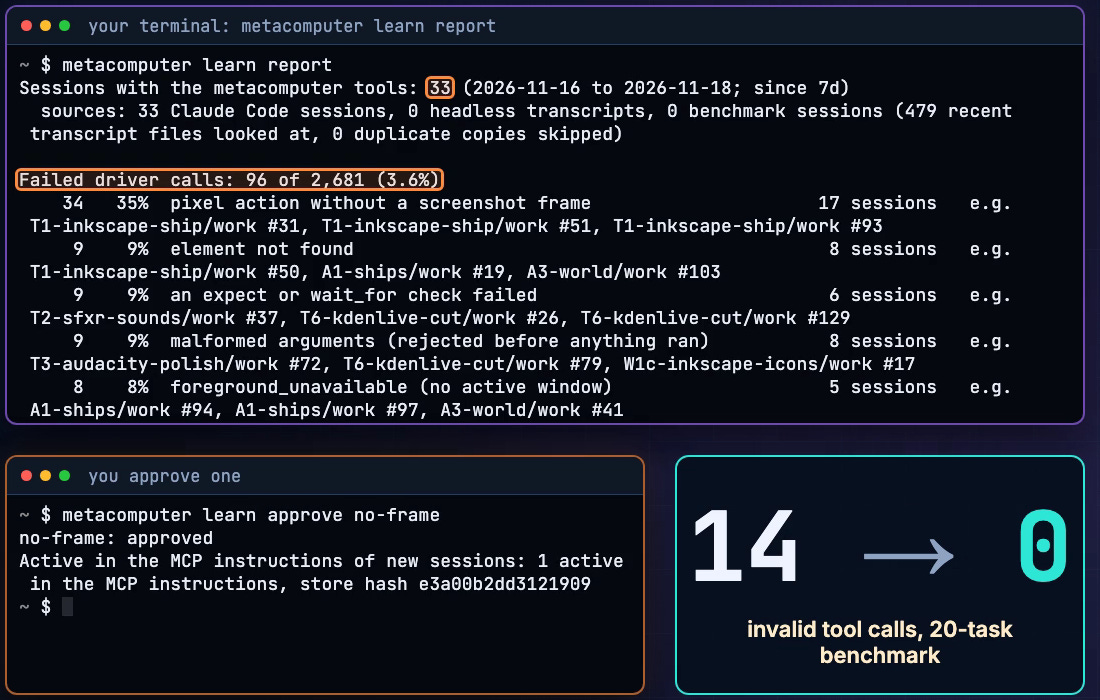
That’s how the built-in habits came about. We mined recorded sessions and turned what we found into rules. On a 20-task benchmark, invalid-argument calls fell from 14 to 1 in a full run, and to 0 once the three affected tasks were run again. The first test of learned lessons on their own was too small to show an effect yet. That’s what the benchmark is for.
It’s the loop I wrote about in Software, Heal Thyself: an agent’s own experience becomes the plan for how it works next time. You decide which lessons stay.
Protections you can check
An agent that uses a computer reads whatever is on the screen, and some of it is written to steer it. No model is immune. So metacomputer limits what the computer can reach, and makes what happens there easy to see.
Walled off. The computer gets no clipboard, microphone or files from your Mac unless you attach a folder, and it can’t reach your other machines.
Hidden text gets marked. Page text a person likely can’t see, or text written to AI agents, is labeled so Claude can point it out. In one test, a page hid a one-pixel note telling AI assistants to send the computer’s SSH keys away. Claude ignored it, but didn’t mention it until asked. Now it’s told to tell you first.
Recordings land on your Mac. They stream there as they’re made, so a script that wipes the computer can’t erase them.
A log that shows edits. Turn on the action log, and a changed or deleted entry shows up when you check it.
Promises pinned to the code. A test checks the docs’ security promises against the code and settings that keep them, so the docs can’t promise more than the code does.
The honest limit: metacomputer keeps a well-behaved agent contained and makes a misbehaving one visible. It doesn’t make a hostile agent harmless. An agent with a shell in the computer can read a password after it’s been typed into a page. And the computer reaches the public internet by design, so anything you put in it could be sent out.
Under the hood
For the engineers:
Cua’s open-source stack. metacomputer is built on Cua‘s MIT-licensed work. Lume runs the virtual machine on Apple’s Virtualization framework, Cua Driver operates the desktop through the accessibility tree, and cua-netgw is the network gateway. metacomputer is the self-hosted way to run that stack, at pinned versions you can fork. It’s made by Metavert, not by Cua, and isn’t endorsed by them.
mcomp-vm, our build of Lume, shares no clipboard, audio or Rosetta with the Mac, and no folders unless you attach them.
One hub per computer. It holds the only connection to the driver, so Claude Code, the CLI and scripts all pass the same guards: one controller at a time, no clicks on an out-of-date screenshot, real input for Chrome, and a bounded mode that allows only the apps and sites you list.
The VM is treated as hostile. What comes back is size-limited and checked, files arrive as plain files, its text is escaped before your terminal shows it, and every download in the build is pinned and verified.
Everything is a command. Claude runs the same
metacomputerCLI you can, with--jsonoutput where scripts need it, and the action log is hash-chained and signed.
What comes next
Over the next few weeks I’ll write up some of these uses in more detail, and report on how the learning loop does as more sessions come in. Then I want to hear what you ask yours to do.
Give it a try here: github.com/metavert-io/metacomputer (MIT). There’s more at metavert.io/metacomputer.
This is fantastic work, pal. I will play with it over the weekend.